
- To add a hyperlink, first copy the URL you want to link to. Then, highlight the text you want to turn into a link, click the link icon (🔗)in the formatting toolbar, and paste the URL. Press Enter or click Apply to finish.
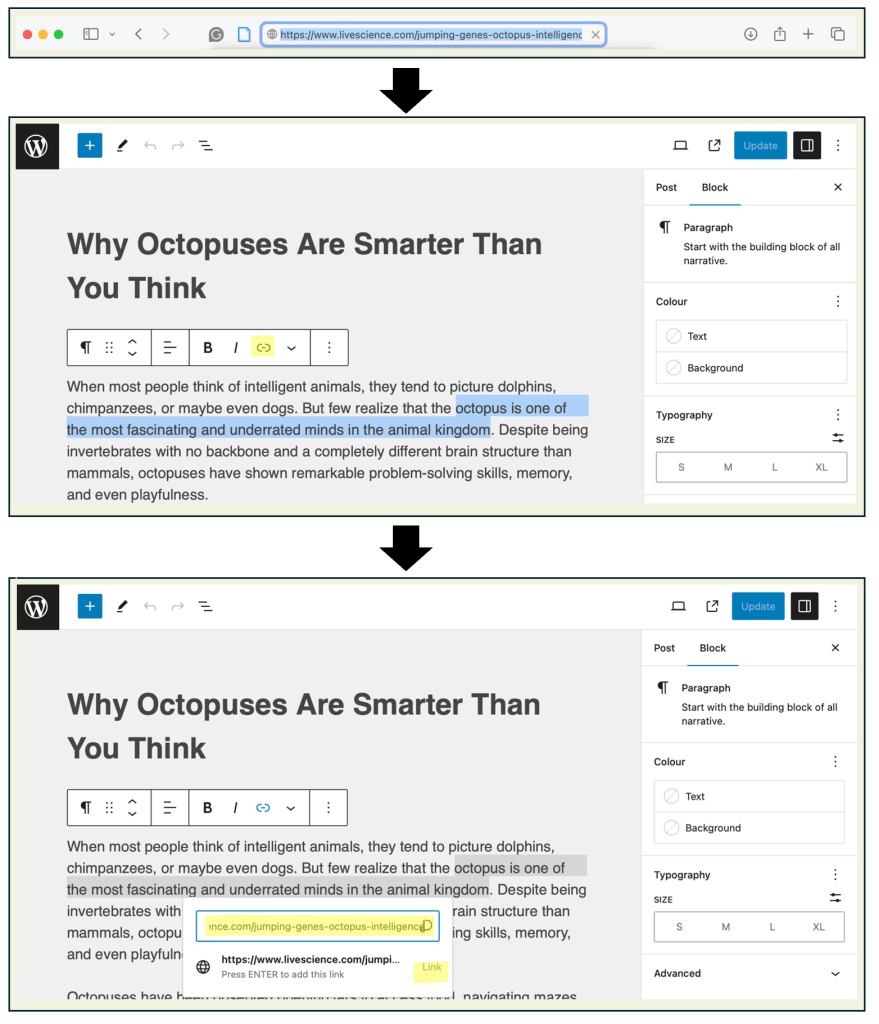
| Important: Hyperlinks can be used for a variety of reasons in your blog post. You might link to a useful resource, credit a citation, or add depth to your ideas. If you make a claim or refer to outside information, include a hyperlink so readers can easily access the source. A strong post is not just opinion—it’s supported by evidence and connection. |
| Task: If you reference a citation, supporting article, or any outside information, add a hyperlink to connect your reader directly to the source. You are required to include at least one hyperlink in your blog post to support your ideas or provide additional context. |
 Digital Literacy Tutorials